1 September 2018

Addiction


In particular response to addiction of video games:

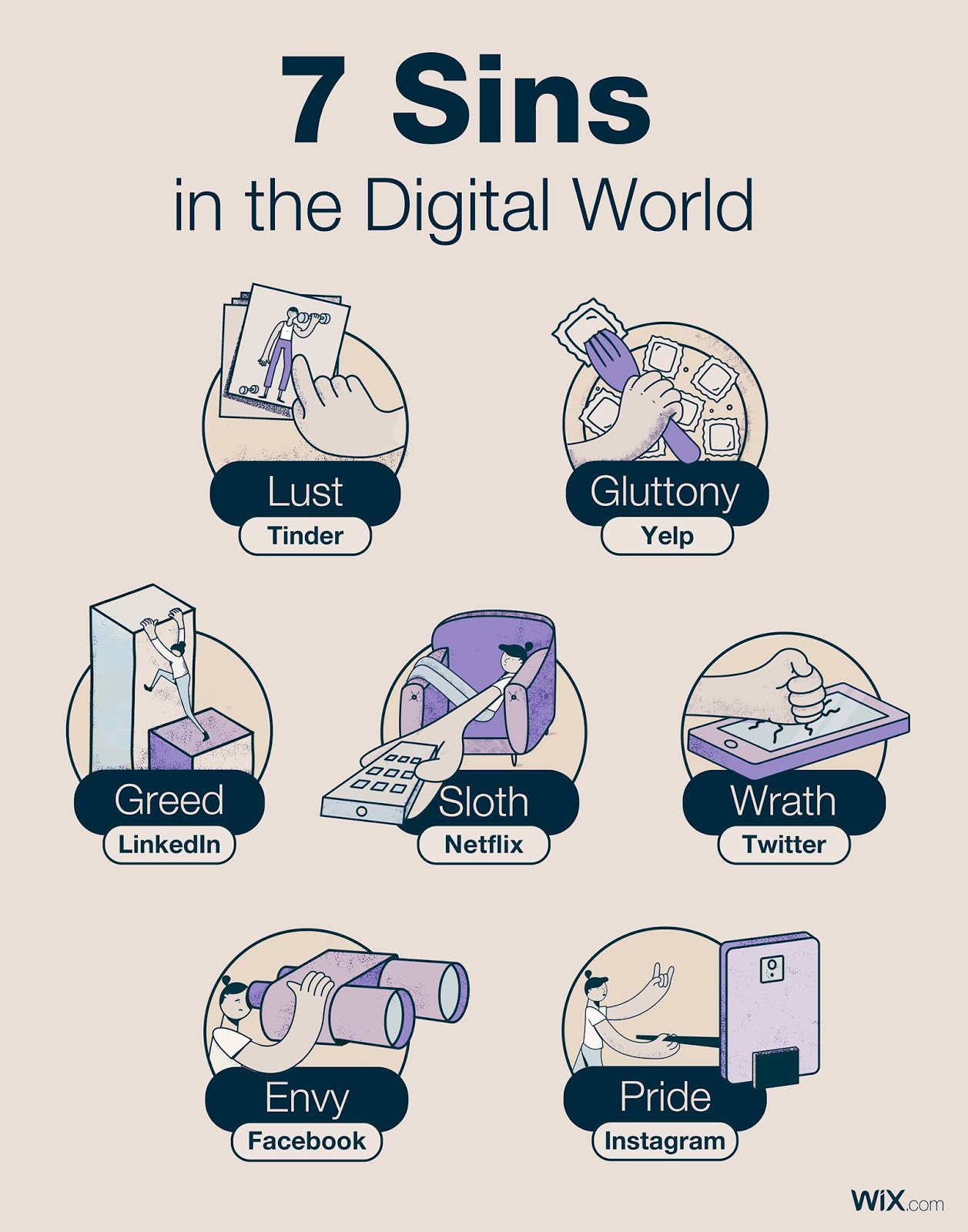
Games are an escape from reality. But games are also a form of play. Both are important to be a functional human being. Technology has evolved a lot in the last few years and I think we are just beginning to scratch the surface. Addiction in general has become a problem with technology, not just games. Social media, movies, series, games, dating: many vices and sins are now easier to accomplish than ever before.
This Kurzgesagt video explains addiction well among other videos they've done on drugs: https://www.youtube.com/watch?v=ao8L-0nSYzg and this one https://www.youtube.com/watch?v=qS6LoRYUdhw

Modern Day Sins (source)


Mental Health

But I think the real problem here is actually mental health and the generalised problem of addiction itself. I'm not sure if it's best to blame video games. I'm more inclined to blame technology. But I feel most that any addictive behaviour is detrimental. What we really need is to reduce addiction on a much bigger scale. If we properly recognise and incorporate mental health awareness into society, and get everyone to feel completely unburdened to talk about their mental thoughts - even to a stranger standing next to you in a queue - then, and only then we will actually be on top of the wider issue of mental health.

Vulnerability

To do that we need to break down some stereotypes of masculinity (not showing vulnerability). To other species it's normal to hide vulnerability, but in this modern world, vulnerability can mean life or death when it comes to mental health issues. The world simply does not suit this innate compulsion to display self-confidence, charisma, and high self-esteem at all times regardless of how you actually think or feel. And this isn't just a throwaway first world problem. This problem actually kills people and that means it really is a serious issue. Sometimes these issues go unlooked as well. PTSD can haunt people their entire lives and never recover (just look at the Hillsborough disaster). Unfortunately, we can't yet erase memories, so we must have after-care.

Maslow's Hierarchy of Needs (source)


Education

I don't blame video games. I blame the education system for not adequately preparing kids for how to live in a modern day world with modern day problems. There is a huge range of subjects that kids need but just don't get (common sense, finance, communication, presenting, respect, owning problems, mindfulness, proactiveness, etc.) This link has some great ideas for example https://successfulstudent.org/20-life-skills-not-taught-in-school/ (except guns of course).
And if we look after our children, all of the gaps that society has to fill will become far less problematic, and then they will know better how to look after themselves. We should arm our children with all of the best weapons to deal with whatever life will throw at them, based on the current modern day issues.

Creativity

We also have to 'preserve' that creativity that kids have - modern day parents are scared of letting their children play outside alone, meaning they spend more time indoors. But it's so important that kids do have time to play and have fun - not just for exercise or energy release, but for mental well-being: it builds up skills in team-working, and doesn't have to be as serious as sports. Play is crucial to development. See this most popular TED video for reference: https://www.youtube.com/watch?v=iG9CE55wbtY

Overall

Video games, in principle, and on their own, are good. Addiction is not good in any form. Society must be reshaped to deal with all addictive outlets and properly prepare children for modern day issues. Fear of showing vulnerability must end. Communication is key.

24 July 2018

Using Proxies with browsers

Downloading Chrome
To download the full version of Chrome instead of the .Net installer (in case you get the error message), use this link instead:
https://www.google.com/intl/en_hk/chrome/?standalone=1
Or try the MSI version (Chrome Enterprise) - it's the same thing, just installed vi MSI instead of EXE.

IE
In IE you can change it under Internet Options, but if an Administrator has blocked editing, you can change it with a regedit - save the following to a file with .reg as the extension and run it to merge.

---
Windows Registry Editor Version 5.00

[HKEY_CURRENT_USER\Software\Microsoft\Windows\CurrentVersion\Internet Settings]
"AutoConfigURL"=""
"MigrateProxy"=dword:00000001
"ProxyEnable"=dword:00000001
"ProxyHttp1.1"=dword:00000000
"ProxyServer"="http://proxy.myserver.com:80"
"ProxyOverride"=""
---

Chrome
Make a copy of a shortcut to Chrome, and under Properties, set the Target to:
"C:\Program Files (x86)\Google\Chrome\Application\chrome.exe" --proxy-server="http://proxy.myserver.com:80" --proxy-bypass-list="localhost"

Firefox
Proxy settings are specific to this application so just change it under Options.

13 July 2018

Troubleshooting tips for a few things

Slide Masters in PowerPoint
If the slide master is not updating a property such as a date in the footer:

  1. On the slide, go to Insert > Header & Footer, then untick the Date or other field no longer needed and click Apply
  2. Repeat the step to re-add the property, it will be re-read from the master slide.

There is no way of getting the total number of slides, so enter this manually into the master slide, then repeat the steps above (adjusting for 'Slide number') to re-add the new format.

Stop Chrome running in the background
https://www.omgchrome.com/stop-chrome-running-in-background-windows/

Firefox is not opening

  1. Try a new profile manager – edit a copy of the Firefox shortcut to “firefox.exe –P”
  2. Use C-Cleaner or BleachBit to clean the temporary files of Firefox
  3. Try Firefox in Safe Mode (with Add-Ons Disabled)
  4. Try resetting Firefox
  5. Try under a different user account
  6. Try running as admin
  7. Reinstall Firefox
  8. Scan your machine for malware


Windows Spotlight images not being updated

1. Try disabling it, restarting and turning it on again via Settings
2. Try deleting the files mentioned here https://www.cnet.com/how-to/where-to-find-the-windows-spotlight-photos/ 

Recovering data

10 July 2018

Locking down Windows 10

This GNU article has a good list that explains the privacy issues with Windows 10 along with many other O.S.es and devices.

There are a lot of sources that can help with this:


  • TronScript has a telemetry-disabling script that will turn off a lot of call-home features, including privacy-recording KBs, services, scheduled tasks and other registry keys.
  • The Unattend file from my last blog disables a lot of settings as well but only works if using sysprep and there may be newer settings in the newer Windows 10 that also need locking down.
  • Some third party tools offer privacy protection, e.g. this list, however they may not be legitimate and I don't endorse them. How To Geek explains the right thought process on these.
  • Group Policy can disable a lot of things. Common Criteria hold a security level known as a Protection Profile that can be added, intended for corporations.

30 June 2018

Windows 10 Unattended Install

Sysprep allows you to prepare the machine before imaging.
Sysprep has 2 modes - Admin Mode, and OOBE. Typically when you choose OOBE, all of the prompts will appear e.g. setting up a username, picking a language, keyboard layout etc.
This can be avoided by providing the option /unattend:unattend.xml when configuring it.

Here's a copy of an unattend file intended for Windows LTSB 1607 Anniversary Update x64 that will:
- Prevent any questions during install
- Keep any configured users
- Keep drivers to target for the same hardware
- Set the time to UTC and keyboards to en-GB with fallback to en-US
- Set the IE homepage to about:blank
- Disable Remote Assistance
- Skip Activation
- Disable Windows Defender
- Put the PC in high performance mode
- Disable telemetry (for more, see TronScript)
- Set the network location to Work

https://drive.google.com/open?id=1QHR-d4XTSSIAZKR2WS4bWzfjCk2iZzjI

22 April 2018

Modern Day Sins

Source: Facebook Wix
To extend this out to all aspects of modern day life, my list would be:

  • Pride = Politics
  • Greed = NASDAQ, FTSE
  • Lust = Red Tube
  • Envy = Facebook
  • Gluttony = McDonald's
  • Wrath = Twitter
  • Sloth = Netflix

20 April 2018

Android vs iOS (UI)

Test devices:
Google Pixel 2 with Android 8.1.0 vs iPhone 6S with iOS 11.3

To be updated with more info as I discover it.


  • Settings Menu
    • In Android, all the settings are nicely grouped and have small summaries of the settings in each section.
    • In iOS, the settings are groped all over the place and in a seemingly nonsensical order.
    • In IOS, if you want to search settings, you have to scroll down and then scroll up to get the search box to appear. Android just shows you the setting as soon as you open it, and can show you recommended settings, or special override settings you've currently got enabled and quick actions for them.
  • Mail program
    • In Android, to search for mail, there is a dedicated search button on the Gmail app.
    • In iOS, to search, you go into a full, pull down to refresh, and then the search box will appear - it's not visible without doing this action first
  • Navigating between apps
    • Android has a dedicated back, home and switching button - very easy to get around and you can snap windows top and below
    • iOS - to go back, you have to tap the very top-left of the screen. Home is the home button, and switch is double-tap.

Android Oreo Settings menu


14 March 2018

Comprehensive guide to Windows Update


  • About
    • Windows Updates come out every second Tuesday of every month (Patch Tuesday or Update Tuesday). 6PM UK time is 9am for Microsoft in the USA though, so the UK won’t get the updates until Tuesday evening – so depending on your work shift, you may get the updates through on the 2nd Wednesday of every month.
  • Advice beforehand
    • Set System Restore to enabled and create a point before installing them
    • Check Twitter for issues here and here
    • Check for issues on the MSRC blog here
    • Check for issues on the Release Notes
    • Check the Windows forum
  • General advice
    • Build update issues and solutions blog here
    • 'Which?' introduction to security and updates here
    • Life cycle fact sheet here
    • Update history for Windows 10 here
    • Cyber Aware here
  • After the upgrade
    • Free up space by using cleanmgr to delete the old Windows installation
    • As recommended by Microsoft, run chkdsk, sfc, and dism to repair Windows
      • chkdsk c: /scan /perf
      • sfc /scannow
      • DISM /Online /Cleanup-Image /RestoreHealth
    • Free up more space
      • dism /online /cleanup-image /startcomponentcleanup /resetbase
  • Settings
    • Windows 10
      • Settings - Update & security - Restart options - Show more notifications - recommend enable
      • Change active hours - recommend setting to best times for you here
      • Choose how updates are delivered - recommend disabling
      • Give me updates for other Microsoft products when I update Windows. - recommend enabling
      • Metered connection - for mobile networks or preventing automatic downloads here and here
      • Defer upgrades here
    • Windows 7
      • Prevent updates being installed on shutdown: how-to
      • Prevent updates being downloaded by changing settings (Do not check for updates)
    • Disable Microsoft Store updates here
    • Aggressive option
      • Disable Windows Update in services.msc
      • Reset script here
  • Troubleshooting
    • Windows 7/8
      • Stuck on 'Checking for updates' here
      • Cannot check for updates Fixitblog
      • Windows Update Troubleshooter Fixit
      • Cannot get other products from Microsoft here to add IE11 to compatibility mode and trusted sites
    • Windows 10
      • Built-in troubleshooter in Settings
    • Various error codes Fixit and here
    • Couldn't complete the updates - reset Windows components here
    • Roll back drivers here
    • Microsoft Store issues here
    • Cannot connect to internet blog
      • Start, type “cmd” and right-click the Command Prompt result, then click Run as administrator
      • Enter the commands:
      • ipconfig /release
      • ipconfig /flushdns
      • ipconfig /renew
    • Manual reset of Windows Update
      • Start - Run - services.msc
      • Stop the services ‘Background Intelligent Transfer Service’, ‘Windows Update’ and 'Update Orchestrator Service'. If you can't stop them, set them to Disabled, and reboot, so they don't start on boot
      • Go to C:\Windows\SoftwareDistribution, and delete everything in the folder (but not the folder itself) (make sure you have 'Show hidden items' and 'Show operating system files' enabled so you can see and delete all files)
      • Restart the PC and run 'Check for updates' again
    • Bootloader problems here
    • Total identified Windows installations: 0 here
    • Use a proxy server
      • netsh winhttp set proxy http://proxy.myproxy.com:80 
        (to turn it off afterwards, run: netsh winhttp reset proxy)
      • There is also a WinINET proxy for Internet Explorer - see more details here
        HKCU\Software\Microsoft\Windows\CurrentVersion\Internet Settings\
        REG_SZ ProxyServer = “proxy.myproxy.com:80”
        REG_SZ ProxyOverride = “localhost”
        REG_DWORD ProxyEnable = 1

25 February 2018

My favourite movies/films

Not an exhaustive list, but it’s a start.

Generally in order of which ones I've either seen the most, have fond memories of, would recommend the most, or simply think are the best. Not including horror movies on this list, as that's really a different category/goal of film.
  1. Spirited Away
  2. Matrix
  3. Truman Show
  4. Donnie Darko
  5. Back To The Future
  6. Groundhog Day
  7. Iron Man
  8. Avengers: Infinity War
  9. Parasite (2019)
  10. WALL-E
  11. Monsters, Inc
  12. Iron Giant
  13. Matilda
  14. Belle (2021)
  15. Hot Fuzz
  16. Shaun of the Dead
  17. Three Billboards Outside Ebbing, Missouri 
  18. Princess Mononoke
  19. Coraline
  20. Moon
  21. Butterfly Effect
  22. Inside Out
  23. Day The Earth Stood Still (original)
  24. Lion King
  25. Aladdin
  26. Terminator 2
  27. Inception
  28. Arrival
  29. Avengers: Endgame
  30. Eternal Sunshine of the Spotless Mind
  31. Toy Story
  32. Toy Story 3
  33. Up
  34. Pan’s Labyrinth
  35. A Beautiful Mind
  36. 12 Years A Slave
  37. Beauty and the Beast
  38. Incredibles
  39. Harry Potter and The Deathly Hallows Part 2
  40. Oblivion
  41. 2001 Space Odyssey
  42. One Flew Over the Cuckoo's Nest
  43. It's a Wonderful Life
  44. X-Men Days of Future Past
  45. Knives Out
  46. Fifth Element
  47. Captain America: The Winter Soldier
  48. Shawshank Redemption
  49. Clockwork Orange
  50. Moonlight
  51. Godfather 2
  52. Kill Bill 2
  53. Elephant Man
  54. Bedazzled
  55. Bruce Almighty
  56. Your Name

Horror

  1. Jeepers Creepers
  2. Shining
  3. The Fly
  4. The Thing
  5. Insidious
  6. Signs
  7. Creep 2
  8. Sixth Sense
  9. Saw
  10. Se7en
  11. It Follows
  12. Babadook
  13. Requiem For A Dream
  14. Ghost Stories
  15. Lights Out
  16. It
  17. A Quiet Place
  18. Grudge
  19. Ring
  20. Paranormal Activity
  21. Invisible Man (2020)
  22. Rec
  23. Blair Witch
  24. Alien
  25. Psycho
  26. Unfriended
  27. Annabelle
  28. Rosemary's Baby
  29. Drag Me To Hell
  30. Mist
  31. Split
  32. Ma
I don't find scary:

  1. Exorcist
  2. Nightmare on Elm Street
  3. Loved Ones
  4. Funny Games
  5. Carrie
  6. Invasion of the Body Snatchers
  7. Hereditary
  8. Any zombie films
  9. Jaws
  10. Get Out
  11. Shutter Island


13 February 2018

Force Awakens vs Last Jedi


  • Indigenous species
    • Ending of FA shows black seagulls occupying the island
    • LJ replaces with with Porgs. Add the crystal foxes, and the toad creatures on the island
  • Plot
    • FA reveals the plot of Luke Skywalker vs Ben Solo shortly after we meet Han Solo again and why Luke ran away.
    • LJ revolves around the reasoning behind Luke's story
    • In LJ, Rey learning the light/dark side of the force even though she'd mastered it in the first film
  • Villains
    • FA reveals Snoke as an intimidating but not formidable character.
    • LJ reveals him in detail, but he is easily killed by Kylo Ren.
  • Powers
    • FA introduces Rey picking up her powers really quickly, never recognised by herself before, compared to Luke doing weeks/months of training
    • LJ introduces new never-before seen powers like:
      • Snoke bringing Kylo and Rey together
      • Leia flying through space
      • Luke creating an interstellar hologram
      • Ghost Yoda is able to cast lightning
  • Fight battles
    • FA has the fights with Kylo (Rey and Finn), and Finn vs the 'Traitor' Stormtrooper
    • LJ has the Praetorian Guard scene
  • Starships
    • LJ introduces the Dreadnought and Snoke's ship
    • LJ introduces a hyperspace jump through a ship to destroy it
  • Humour
    • FA has BB-8, C-3PO providing quips, and Kylo attacking the computer consoles twice
    • LJ has Chewie preparing to eat roast Prog, the toad creatures getty angry, Yoda making quips, and Kylo attacking the elevator